



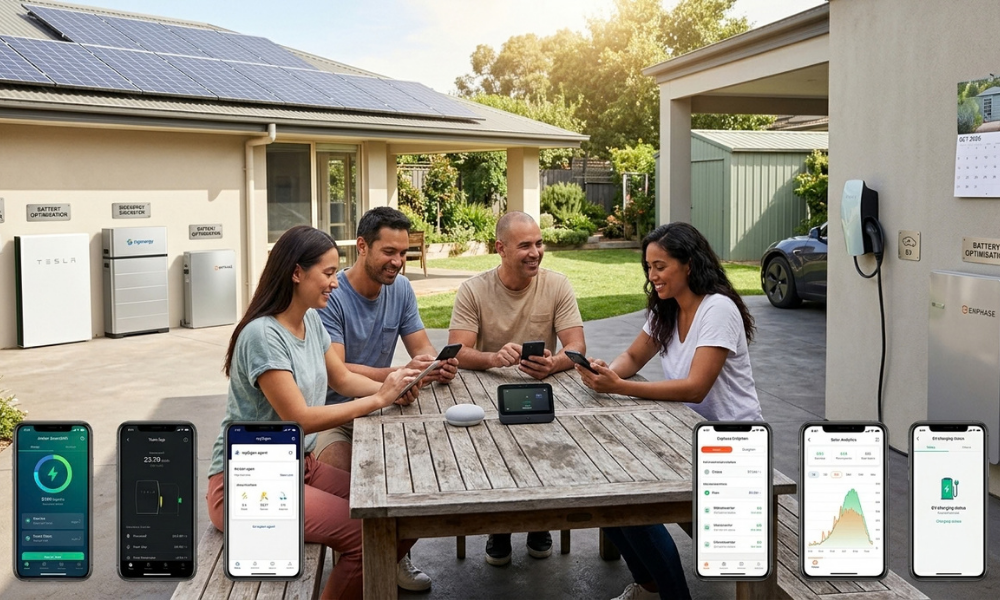
At 1pm on a sunny day, a typical Australian solar home is sending power to the grid for 3 to 5 cents per kWh. By 7pm, the same household is buying it back at around 30 to 35 cents. Closing that gap used to take timers, spreadsheets and a lot of attention. In 2026, a growing number of homeowners hand the job to an app.
AI energy apps in Australia range from simple usage trackers to software that forecasts the weather and electricity prices, then decides when the battery charges, when the EV plugs in and when the house exports. Most only work fully with particular inverters or batteries, so the right choice depends on what’s already on your roof and in your garage.
Below, we’ve grouped the options by hardware, with a quick way to test whether an app’s “AI” does anything useful.
Quick summary
- The best app depends on your hardware. Many apps only offer full control of their own brand’s inverter or battery.
- Battery owners get the most value, because AI needs storage to act on its decisions.
- Homes without a battery can still benefit from monitoring apps that find waste, recommend better plans and help size future upgrades.
What makes an energy app “AI” (and what doesn’t)
Almost every energy app now claims to be smart. In practice, they fall into three levels:
- Monitoring and insights: the app shows your solar generation, usage and costs, and may suggest ways to save. You make the decisions.
- Automation: the app follows rules you set, such as charging the battery at noon or running the hot water when solar exceeds a threshold.
- AI optimisation: the app forecasts solar output, household usage and electricity prices, then decides on its own and adjusts as conditions change.
The quick test: does the app forecast, decide and act on your devices, or does it just display data? For a deeper look at what AI energy management does, read AI Is Now Managing Australian Home Energy. Should You Let It? and What an AI-Optimised Home Battery Actually Does All Day.
Expert tip: Before choosing an app, ask whether it can control your battery or only show its state. Many “smart” apps are monitoring tools only, and the difference matters far more than the dashboard design.
At a glance: the best AI energy apps in 2026
| App | Best for | Works with | Capability | Battery needed? | Cost | Key conditions |
| Amber SmartShift | Engaged battery owners | Compatible batteries, some EVs | AI optimisation | Yes | $25/month Amber membership (per meter), plus wholesale-linked energy costs | Must switch to Amber; VIC, SA, NSW, ACT, SE QLD only |
| Tesla app | Powerwall owners | Tesla Powerwall | Automation and VPP | Yes | Free with Powerwall | Powerwall only |
| Reposit Power | Guaranteed bill outcomes | Reposit-installed systems | Forecast-based control | Yes | Personalised quote | Mainly sold as complete No Bill solar and battery systems |
| mySigen (SigenAgent) | Sigenergy owners | Sigenergy systems | AI optimisation | Recommended | Free with Sigenergy system; SigenAgent delivered as a free update | Sigenergy hardware only |
| mySolarEdge | SolarEdge owners | SolarEdge ecosystem | Automation, AI planning in some markets | Recommended | Free with SolarEdge system | Confirm Australian features |
| Enphase Enlighten | Enphase owners | Enphase microinverters, IQ Battery | Automation | Recommended | Free with Enphase system | Enphase hardware only |
| Powerpal | Homes without solar or a battery | Most smart meters | Monitoring and insights | No | Price set by provider; Victorian households can get up to $70 off via VEU | Sensor fitted to meter |
| Solar Analytics | Independent solar monitoring | Many inverter brands | Monitoring and insights | No | From $5.99/month or $59.99/year; free with CATCH Control device (hardware extra) | Device or supported inverter required |
| Home Assistant | DIY tinkerers | Wide range, via integrations | User-built automation | No | Free software; hardware to run it; optional cloud subscription (about US$6.50/month) | Technical skills required |
Prices checked September 2026 and subject to change. Hardware and installation costs are extra where noted.
Best apps for battery optimisation
If you own a home battery, these apps can decide when to charge, hold and discharge, which is where AI adds the most value.
Amber SmartShift
SmartShift is Amber’s battery automation, available to customers on its wholesale-linked electricity plans. It learns your household usage and forecasts your solar generation and wholesale prices, then updates a plan for your battery every 5 minutes, which you can view in the Amber app.
That means your battery can charge when prices are low or negative and export when prices spike. You can also take manual control at any time, such as charging up before a storm or dispatching during a price spike.
Amber charges a flat $25 monthly membership fee, which it says is its only margin, and passes wholesale energy and network costs through at cost. The fee is charged per meter, so homes with two meters pay it twice.
The trade-off is exposure to the wholesale market. You’ll need to switch to Amber, which is available in VIC, SA, NSW, ACT and south-east Queensland, and your bills can move with market conditions. SmartShift suits households comfortable watching prices, not those who want a fixed, predictable bill.
Tesla app (Powerwall)
For Powerwall owners, the Tesla app offers a mature experience with backup reserve settings, time-based control and access to retailer-linked VPP programs. It’s free with a Powerwall and tightly integrated, but works only with Tesla hardware, so it isn’t an option if you have another battery brand.
Reposit Power
Reposit’s controller forecasts weather, grid conditions and your household’s needs to decide when to store, use and export energy. Rather than an add-on app, Reposit now mainly sells complete solar and battery systems under its No Bill guarantee, which uses the system’s earnings to cover your electricity charges up to a fair-use cap. Pricing is by personalised quote. It suits households that want a guaranteed outcome rather than wholesale exposure, but read the fair-use conditions carefully before signing.
Expert tip: Set your backup reserve before letting any app take control. The reserve determines how much of your battery the AI can use, and how much stays available for blackouts or your evening peak.
Best apps built into your inverter or battery
If you’re buying a new system, the manufacturer’s app will likely be your main control tool for a decade or more. These apps come free with the hardware, so compare them as carefully as the equipment.
Sigenergy mySigen with SigenAgent
Sigenergy launched SigenAgent in June 2026 through mySigen App 4.0, delivered to existing systems as a free software update. Instead of adjusting settings manually, you set a goal, such as lower bills, higher self-consumption, secure backup or better returns, and the AI plans and coordinates your devices to meet it.
It includes separate agents for household energy planning, system diagnosis and price-based trading. The energy planning agent acts only after you confirm its strategy, which gives you a check on automated decisions.
SolarEdge (mySolarEdge)
The mySolarEdge app lets SolarEdge Home owners control, schedule and track energy use across solar, batteries, EV chargers and smart devices. SolarEdge’s AI optimisation platform, SolarEdge ONE, builds a 24-hour energy plan using weather forecasts, rates and household patterns. It launched first in European markets, so confirm which features are live in Australia.
Enphase Enlighten
The Enlighten app gives Enphase owners visibility across solar, household loads and IQ Batteries, with tariff scheduling to time-shift battery use. It works best within an all-Enphase system.
Expert tip: Ask your installer to demonstrate the app before you sign a quote. Check whether it supports your tariff type, manual override and data export, and whether key features need extra hardware.



Best apps if you don’t have a battery
You don’t need a battery to benefit from an energy app. Monitoring tools can show where your money goes and help you plan upgrades.
Powerpal
Powerpal, now offered through Amber, is a small sensor that fits to your electricity meter and connects to an app on your phone, showing your usage and costs in real time. It also provides a personalised to-do list based on your energy profile, plus estimates from a solar simulator.
Powerpal is handled by Amber’s sister company, which helps with installation and eligible rebates. Victorian households can get a discount of up to $70 on an in-home display like Powerpal through the Victorian Energy Upgrades program, with the final price set by the accredited provider. Outside Victoria, ask Powerpal for current pricing.
Solar Analytics
Solar Analytics is an independent monitoring platform that works with many inverter brands, unlike most manufacturer apps. It says it saves households around $400 a year by finding better electricity plans, detecting faults faster and guiding upgrade decisions. Its free Solar Maximiser report compares solar, battery and heat pump options to find the combination with the biggest savings.
Subscriptions start at $5.99 a month or $59.99 a year. If you have a Fronius, Sungrow, GoodWe, GE Solar or LG inverter, it can connect through the inverter without extra hardware. Alternatively, the subscription is free with a CATCH Control device, though you’ll pay for the hardware and installation.
Expert tip: Use a monitoring app for at least a month before buying a battery. Real usage data shows how much you consume in the evening, which is the best guide to how big your battery needs to be.
Best apps for EV solar charging
For many households, an EV is the biggest battery in the home. Smart charging can direct surplus solar into your car instead of exporting it for a few cents.
Amber EV charging
Amber customers can automate EV charging in the Amber app with Amber for EVs, included in the Amber membership. You set a deadline, and Amber plans charging using the cheapest price windows until then. It can prioritise spare solar, fall back to a forecast based on your system and weather if your inverter isn’t supported, and coordinate with your home battery so the two don’t compete.
Amber absorbed the technology from Charge HQ, a popular independent solar charging app it bought in 2025 and closed in September 2026. That makes Amber the main option for households wanting cross-brand smart charging, but it requires switching to Amber’s wholesale-linked plan.
Built-in charging from your inverter brand
Some inverter ecosystems include EV charging, which avoids the need for a separate app. SolarEdge Home includes its own EV charger managed through the mySolarEdge app, and Sigenergy’s SigenStor integrates a DC EV charger into the system, managed through mySigen. If you’re buying a new system and plan to get an EV, this is worth factoring into your choice.
Expert tip: Many EV chargers also have their own solar-charging modes using a CT clamp on your main supply, with no app subscription required. Ask your installer whether your charger supports this before paying for a separate service.
For tinkerers: DIY energy management
Home Assistant
Home Assistant is a free, open-source home automation platform that connects to many inverters, batteries, EV chargers, smart plugs and electricity price feeds. You can build your own rules, such as starting the pool pump when solar exceeds a set level, or charging the EV when prices drop.
The software is free, but you’ll need a small computer or dedicated device to run it. An optional Home Assistant Cloud subscription adds secure remote access and voice assistant integrations for about US$6.50 a month, with local pricing varying by currency. It’s extremely flexible and runs locally, but it takes time and technical skill to set up and maintain.
Expert tip: DIY control of a battery or inverter may affect its warranty or grid compliance settings. Check the manufacturer’s terms before automating charge and discharge yourself.
How to choose the right app for your home
Start with four questions:
- Do you have a battery? If not, start with a monitoring app. If yes, look at battery optimisation apps and your manufacturer’s app.
- What brand is your inverter and battery? Confirm compatibility at the model level, not just the brand.
- Will you switch retailers? Some of the most capable options, like Amber and many VPPs, require it.
- Do you prefer upside or certainty? Wholesale-linked apps can earn more but vary with the market. Fixed VPP payments and guaranteed-bill plans are more predictable.
Before handing over control, check:
- Backup reserve: how much battery stays available for your home.
- Battery warranty: whether extra cycling from VPP or trading activity is covered.
- Manual override: whether you can step in when needed.
- Data access: whether you can export your data if you switch apps.
- Provider stability: apps change and sometimes disappear. Charge HQ, a popular solar EV charging app, closed in September 2026, and users had to download their charging history before the shutdown. Amber and Evergen also retired their joint battery offering as Evergen shifted to business services.
Coordinated batteries are also becoming a bigger part of Australia’s grid. The Clean Energy Council recorded 183,245 home batteries sold in the second half of 2025, and AEMO’s Draft 2026 Integrated System Plan expects a growing share of household batteries to be coordinated through VPPs. If you’re in NSW, check the NSW Government’s VPP incentive criteria, since some programs require joining an approved VPP.
Expert tip: Choose an app you can leave. Manual override, data export and clear exit terms protect you if the app changes, the provider is acquired, or it shuts down altogether.
Frequently asked questions
What is the best AI energy app in Australia?
The best app depends on your hardware and goals. Amber SmartShift suits battery owners comfortable with wholesale pricing, while manufacturer apps like mySigen, Tesla and Enphase Enlighten suit their own systems. Homes without batteries benefit most from monitoring apps like Powerpal or Solar Analytics. Check compatibility first.
Do I need a battery to use an AI energy app?
No, but a battery unlocks most AI features, because the app needs storage to act on its forecasts. Without a battery, monitoring apps can still show real-time usage, detect faults, recommend better electricity plans and help you decide whether a battery, heat pump or EV charger is worth buying.
Are AI energy apps free?
Manufacturer apps from Tesla, Sigenergy, SolarEdge and Enphase are free with their hardware. Independent services usually cost extra: Amber charges a $25 monthly membership, and Solar Analytics subscriptions start at $5.99 a month. Monitoring devices and controllers may also need hardware and installation, so check total costs before signing up.
Can an AI energy app void my battery warranty?
It can, in some cases. VPP participation and wholesale trading can increase how often your battery charges and discharges, and some warranties limit cycling or throughput. Check your battery manufacturer’s warranty terms and ask the app provider how it manages cycling before enrolling your battery.
Do I have to change electricity retailers to use these apps?
Sometimes. Services like Amber SmartShift and many VPP programs require switching to a specific retailer. Manufacturer apps, monitoring apps and DIY platforms usually work with any retailer. Compare the whole electricity plan, including usage rates, supply charges and export terms, not just the app’s features.
Key takeaways
- Start with the hardware you already own, because compatibility decides which apps can control your system.
- Battery owners gain the most from AI optimisation, since the app needs storage to act on its forecasts.
- Monitoring apps suit homes without batteries and help size future upgrades, often for a few dollars a month.
- Check your backup reserve, battery warranty and retailer requirements before handing over control.
- Choose apps that offer manual override, data export and clear exit terms, because even popular apps can close.